
MediaCP hosting, explained
MediaCP is a web control panel for internet radio. It runs your Shoutcast or Icecast server and its Liquidsoap AutoDJ, so you manage music, schedules, live shows and listener reports from a browser or phone. MediaCP hosting means a provider installs, licenses and looks after it for you.
What MediaCP does, and where it sits
An internet radio stream has three parts: your audio, a streaming server and your listeners. MediaCP sits above all three and controls them, from the music the AutoDJ plays to who is allowed to listen.
MediaCP runs the server, feeds it Liquidsoap AutoDJ, secures the stream and reports every listener
- Source
Your audio
Live from broadcasting software such as BUTT, or AutoDJ playing music you uploaded.
- Server
Shoutcast or Icecast
Takes in one stream and sends a copy to every listener at the same moment, over HTTPS.
- Audience
Your listeners
On your website's player, your station page, radio apps and smart speakers.
The six parts of MediaCP you will use
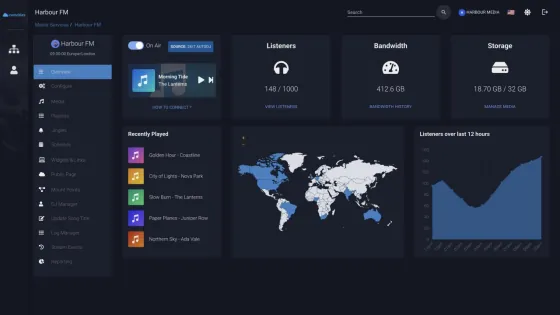
- Station HQ
- The overview for your station: whether it is on air, what is playing now, what played recently and who is listening, updating live.
- Media library
- Drag tracks in from your desktop or upload over FTP. Artist, title and cover art are read from each file, and you can edit them in the panel.
- AutoDJ playlists
- A drag-and-drop builder for rotations, jingles and scheduled shows, played 24/7 by Liquidsoap with your computer switched off. The three playlist types
- Stream security
- HTTPS stream links, and rules for who may listen: by country, by website and by IP address. How it works
- Player & station page
- An HTML5 player with cover art, a public page for your station, and copy-and-paste widgets: now playing, recently played, upcoming schedule and a listener map.
- Reports
- Listeners, sessions, countries, cities and tracks over the periods you choose, on screen or downloaded. What it reports
Liquidsoap AutoDJ: three playlist types
MediaCP's AutoDJ is Liquidsoap, open-source radio automation that is actively maintained. A station mixes the three types below, so the music, the jingles and the shows each turn up when they should.
| Playlist type | What it does | Use it for |
|---|---|---|
| General rotation | Plays your main music whenever nothing else is due. Run several, weighted, for a varied mix. | Your everyday music |
| Interval | Plays every few songs or every few minutes, and can be laid over the music. | Jingles, station IDs, adverts |
| Scheduled | Takes over at a time you choose, once or as a recurring event. | Pre-recorded shows, weekly specials |
How a live show takes over from AutoDJ
-
AutoDJ keeps you on air
Rotations, jingles and scheduled shows run through the night and between live slots.
-
You go live
Your broadcasting software connects. AutoDJ steps aside and your live show goes out.
-
AutoDJ picks up again
When you disconnect, the playlists carry on. Listeners stay connected the whole time.
Who can listen, and how the stream is secured
A stream link is public by default: anyone who has it can play it, and a plain http link won't play on a secure website. MediaCP handles both.
Country locking matters most to stations whose music licence covers only some countries.
- HTTPS streaming
- Icecast and Shoutcast 2.6 serve HTTPS natively; older servers go through MediaCP's stream proxy.
- Country locking
- Allow or block listening by country. Included free on our plans.
- Domain locking
- Lets your player work only on the websites you name, so others can't embed your stream.
- IP allow list
- Always lets the IP addresses you choose listen, such as your studio's, even if another rule would block them.
What MediaCP measures
A streaming server shows how many people are connected now and little else. MediaCP keeps the history, so you can see which hours, shows and songs hold an audience.
Reports cover the last 24 hours, 7 or 14 days, this month or last month, or a date range you pick. You can download them for music licensing returns.
- Listeners & sessions
- Connections and how long each listener stayed, across the period you choose.
- Countries & cities
- Where your audience is, down to the city, with a heat map.
- Media files
- Which tracks played and when, for your playlists and your royalty returns.
- Data transfer
- How much data your stream sent over the period.
MediaCP for many stations
MediaCP is also built for hosting businesses. Installed on a server of your own, it gives you an admin view to create, limit and suspend stations, and lets you set up resellers of your own to sell them.
Our reseller plans run on Centova Cast. For MediaCP, use a Radio VDS.
- Limits per station: listeners, bitrate, storage and monthly transfer
- Reseller plans with their own limits, to package and price as they like
- Billing integration for WHMCS, Blesta, ClientExec and WiseCP
- A REST API and webhooks for your own automation
- White-label branding, so clients see your name
MediaCP or Centova Cast?
With us, both panels run the same Shoutcast or Icecast server at the same price, with the same 1,000 to 2,000 listeners and 32 to 64 GB of AutoDJ storage. The difference is the panel you work in.
Choose MediaCP for a modern panel that works well on a phone, in 14 languages, with drag-and-drop uploads and country locking included free.
Choose Centova Cast if you or your DJs already know it, or you want its four playlist types and track popularity reports. Centova Cast explained
MediaCP hosting vs running it yourself
MediaCP sells its panel as software you install and maintain on your own Linux server. Hosting hands that work to a provider.
| Hosted by Comcities | On your own server | |
|---|---|---|
| MediaCP licence | Included in the plan | Yours to buy; $25/mo through us |
| Server | Ours, on RAID storage | Yours to rent and secure |
| Streaming software | Shoutcast v2.6.1, Icecast and Liquidsoap, kept up to date | You install and update it |
| SSL stream link | Included | You set it up |
| Monitoring | Our 24/7 checks and public status page | You |
| Best for | One station, live or on AutoDJ | Many stations, or selling them under your brand |
Choose hosted if you want to broadcast, not run servers: you get a login and a stream link, and we handle the rest.
Choose your own server to run MediaCP for many stations. A Radio VDS is a server only you use, and we manage it for you.
MediaCP, answered
Something we haven't covered? Our team answers every ticket within 24 hours, usually much sooner.
Submit a ticketWhat is MediaCP?
MediaCP (Media Control Panel) is a web control panel for internet radio, developed by the company of the same name since 2006. It runs and monitors a Shoutcast or Icecast streaming server, plays music with its Liquidsoap AutoDJ when nobody is live, and reports who is listening, so a station is managed from a browser in any of 14 languages.
What does MediaCP hosting mean?
It means a provider runs MediaCP for you: the licence, the server, the streaming software and the updates. You get a login and a stream link, and you don't install anything. With us it comes with every Shoutcast and Icecast plan, from $6 a month.
Is MediaCP free?
No. MediaCP is commercial software, licensed to whoever installs it on a server. On our hosting plans the licence is included in the price. On a server of your own, such as a Radio VDS, an unlimited-station licence through us is $25 a month.
Does MediaCP work with Shoutcast and Icecast?
Yes. MediaCP supports Shoutcast v1 and v2, Icecast 2 and Icecast KH. We run Shoutcast v2.6.1 and Icecast. The panel works the same for both. See how the two servers differ.
What AutoDJ does MediaCP use?
MediaCP uses Liquidsoap, an actively maintained open-source program for automating radio. Upload tracks by dragging them into the browser or over FTP, build general rotation, interval and scheduled playlists, and the server plays them around the clock with your computer switched off.
How do I broadcast live through MediaCP?
Enter the server address, port and source password from the panel into broadcasting software such as BUTT, RadioBOSS or SAM Broadcaster. When you connect, AutoDJ steps aside and your show goes out; when you disconnect, AutoDJ carries on. Listeners stay connected throughout.
Does MediaCP support HTTPS streaming?
Yes. Icecast and Shoutcast 2.6 streams are served over HTTPS natively, and older servers through MediaCP's stream proxy. Every plan with us includes an SSL stream link, so players on a secure website work without browser warnings.
Can MediaCP block listeners by country?
Yes. Geo locking lets you allow or block listening by country, lock the player to your own domains, and allow particular IP addresses. On our plans, country locking is included free.
Should I choose MediaCP or Centova Cast?
With us the server, price, listener slots and AutoDJ storage are the same under both, so the choice is the panel you prefer to work in. Choose MediaCP for its modern, mobile-friendly interface, 14 languages and free country locking. Choose Centova Cast if you or your DJs already know it.
Use MediaCP with us
MediaCP comes with every Shoutcast and Icecast plan. You choose it when you order. Pick the page that fits what you broadcast.
Good to know
- Feature descriptions follow MediaCP's own product pages (read October 2026). MediaCP is developed by MediaCP, not by Comcities.
- Music licences for what you broadcast are yours to arrange. See our Terms of Service.
- Server resources follow our Resource Usage Policy; refunds within 30 days follow our Refund Policy.
- Trademarks belong to their owners and are used only to describe the service.