
Centova Cast hosting, explained
Centova Cast is a web control panel for internet radio. It runs your Shoutcast or Icecast server and its AutoDJ, so you manage music, schedules, live DJs and listener statistics from a browser. Centova Cast hosting means a provider installs, licenses and looks after it for you.
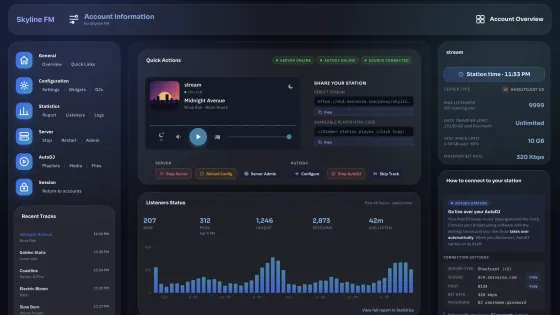
What Centova Cast does, and where it sits
Your audio travels through a streaming server to your listeners. Centova Cast gives you one place to control the server, schedule the music and see who is tuned in.
Centova Cast starts, stops and watches the server, feeds it AutoDJ and counts every listener
- Source
Your audio
Live from broadcasting software such as BUTT, or AutoDJ playing music you uploaded.
- Server
Shoutcast or Icecast
Takes in one stream and sends a copy to every listener at the same moment.
- Audience
Your listeners
On your website's player, in radio apps and directories, and on smart speakers.
The six parts of Centova Cast you will use
- Stream settings
- Start, stop and restart your server, change its title and genre, set passwords and read its logs. Common options come first; advanced ones sit in later tabs.
- Media library
- Your uploaded music, searchable by artist, album, title or genre, like a desktop music player in the browser. Upload in the browser or over FTP.
- AutoDJ playlists
- Drag tracks into playlists and schedules, and the server plays them 24/7 with your computer switched off. The four playlist types
- DJ accounts
- A separate login for each presenter, so several DJs can broadcast live without sharing your main password.
- Statistics & reports
- Who is listening now, from where and with what player, plus trends, track popularity and monthly royalty reports. What it measures
- Widgets & start page
- Now playing, recent tracks, song requests, tune-in links and a listener map, to embed on your site or use on the station page Centova Cast builds for you.
The four AutoDJ playlist types, and what each is for
A station runs several playlists at once. Mixed together, they replace the scheduling software a station would otherwise run on its own computer.
| Playlist type | What it does | Use it for |
|---|---|---|
| General rotation | Plays your main music all day, weighted so popular tracks come round more often. | Your everyday music mix |
| Interval | Plays every few minutes, or after every few songs. | Jingles, station IDs, adverts |
| Scheduled | Plays at a set date and time, once or on repeat. | Pre-recorded shows, countdowns, news |
| Immediate | Plays as soon as you switch it on, after the current song ends. | Requests, breaking announcements |
How a live show takes over from AutoDJ
-
AutoDJ keeps you on air
Your playlists run through the night and between shows, with nobody at a computer.
-
A DJ connects
Broadcasting software logs in with the DJ's details. AutoDJ steps aside and the live show goes out.
-
AutoDJ picks up again
When the DJ disconnects, the playlists carry on. Listeners stay connected the whole time.
What Centova Cast measures
Listener numbers are the one thing a streaming server can't show you clearly on its own. Centova Cast keeps a history for each station, so you can see which shows and songs hold an audience.
Its user-agent report also marks each connection as a media player or a stream ripper, which helps spot people recording your stream.
- Live listeners
- Who is tuned in right now, their country and the player they use.
- Recent activity
- The last 48 hours of listeners, average session length, total listening hours and data transfer.
- Countries
- Where your audience is, ranked by listening minutes and sessions.
- Track popularity
- Your most and least popular songs over 30 days, judged by tune-ins and tune-outs while each one played.
- Royalty reports
- A monthly spreadsheet of every song played, with date, time and audience, for music licensing returns.
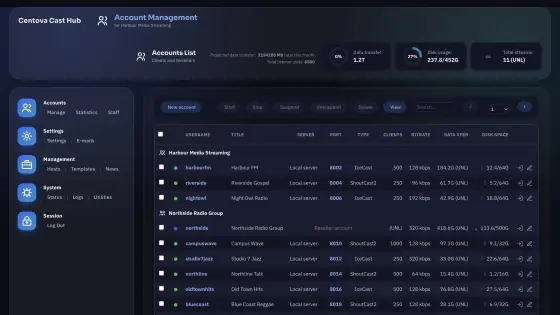
One panel for many stations
Centova Cast was built for hosting businesses as well as single stations. A reseller account gets its own admin view to create, suspend and remove client stations.
- Limits per station: listeners, bitrate, disk and monthly transfer
- Email warnings before a station runs out of transfer or disk
- Shoutcast or Icecast, chosen per station
- Billing integration such as WHMCS, plus an API
Selling stations to clients? See radio reseller hosting
Centova Cast hosting vs running it yourself
Centova sells Centova Cast as software you install and maintain on your own Linux server. Hosting hands that work to a provider.
| Hosted by Comcities | On your own server | |
|---|---|---|
| Centova Cast licence | Included in the plan | Yours to buy; $21/mo through us |
| Server | Ours, on RAID storage | Yours to rent and secure |
| Streaming software | Shoutcast v2.6.1, Icecast and AutoDJ, kept up to date | You install and update it |
| SSL stream link | Included | You set it up |
| Monitoring | Centova Cast plus our 24/7 checks | Centova Cast, and you |
| Best for | One station, or reselling up to 30 | Large networks that need a whole server |
Choose hosted if you want to broadcast, not run servers: you get a login and a stream link, and we handle the rest.
Choose your own server if you need no limit on stations or bitrate. A Radio VDS is a server only you use, and we manage it for you.
Centova Cast, answered
Something we haven't covered? Our team answers every ticket within 24 hours, usually much sooner.
Submit a ticketWhat is Centova Cast?
Centova Cast is a web control panel for internet radio, made by Centova Technologies. It runs and monitors a Shoutcast or Icecast streaming server, plays music with its AutoDJ when nobody is live, and shows who is listening, so a station is managed from a browser instead of a server's command line.
What does Centova Cast hosting mean?
It means a provider runs Centova Cast for you: the licence, the server, the streaming software and the updates. You get a login and a stream link, and you don't install anything. With us it comes with every Shoutcast and Icecast plan, from $6 a month.
Is Centova Cast free?
No. Centova Cast is commercial software, licensed by Centova Technologies to whoever installs it on a server. On our hosting plans the licence is included in the price. On a server of your own, such as a Radio VDS, an unlimited-station licence through us is $21 a month.
Does Centova Cast work with Shoutcast and Icecast?
Yes. Centova Cast supports Shoutcast v1, Shoutcast v2 and Icecast, and sets up the right one when a station is created. We run Shoutcast v2.6.1 and Icecast. The panel looks and works the same for both; see how the two servers differ.
How does AutoDJ work in Centova Cast?
Upload music in your browser or over FTP, and it appears in the media library, searchable by artist, album, title or genre. Drag tracks into playlists: general rotation, interval, scheduled or immediate. The server then plays them around the clock, with your computer switched off.
How do I broadcast live through Centova Cast?
Create a DJ account in the panel, then enter the server address, port and DJ login it shows into broadcasting software such as BUTT, RadioBOSS or SAM Broadcaster. When you connect, AutoDJ steps aside and your show goes out; when you disconnect, AutoDJ carries on. Listeners stay connected throughout.
What statistics does Centova Cast show?
Live listeners with their country and player, listener trends and average session length, total listening hours, data transfer, and the most and least popular tracks. Each month it also produces a downloadable spreadsheet of every song played, with the date, time and audience, for music licensing reports.
What happens if my stream goes down?
Centova Cast watches the streaming server and restarts it within seconds if it crashes or stops, and can email you about it. On top of that we monitor our servers around the clock, and our public status page shows their uptime.
Should I choose Centova Cast or MediaCP?
With us the server, price, listener slots and AutoDJ storage are the same under both, so the choice is the panel you prefer to work in. Choose Centova Cast for its four playlist types and track popularity reports, or if you or your DJs already know it. You pick the panel when you order a Shoutcast or Icecast plan; see MediaCP explained.
Use Centova Cast with us
Centova Cast comes with every station plan; you choose it when you order. Pick the page that fits what you broadcast.
Good to know
- Feature descriptions follow Centova Technologies' product tour (read October 2026). Centova Cast is developed by Centova Technologies Inc., not by Comcities.
- Music licences for what you broadcast are yours to arrange. See our Terms of Service.
- Server resources follow our Resource Usage Policy; refunds within 30 days follow our Refund Policy.
- Trademarks belong to their owners and are used only to describe the service.